Ir para conteúdo
View in the app

A better way to browse. Learn more.

MuAwaY Forum

A full-screen app on your home screen with push notifications, badges and more.

To install this app on iOS and iPadOS
  1. Tap the Share icon in Safari
  2. Scroll the menu and tap Add to Home Screen.
  3. Tap Add in the top-right corner.
To install this app on Android
  1. Tap the 3-dot menu (⋮) in the top-right corner of the browser.
  2. Tap Add to Home screen or Install app.
  3. Confirm by tapping Install.

(Resolvido)Regarding the error to run the launcher.

Postado
Hello , i cant join in the game . gives the error in the picture , please help me . thanks.
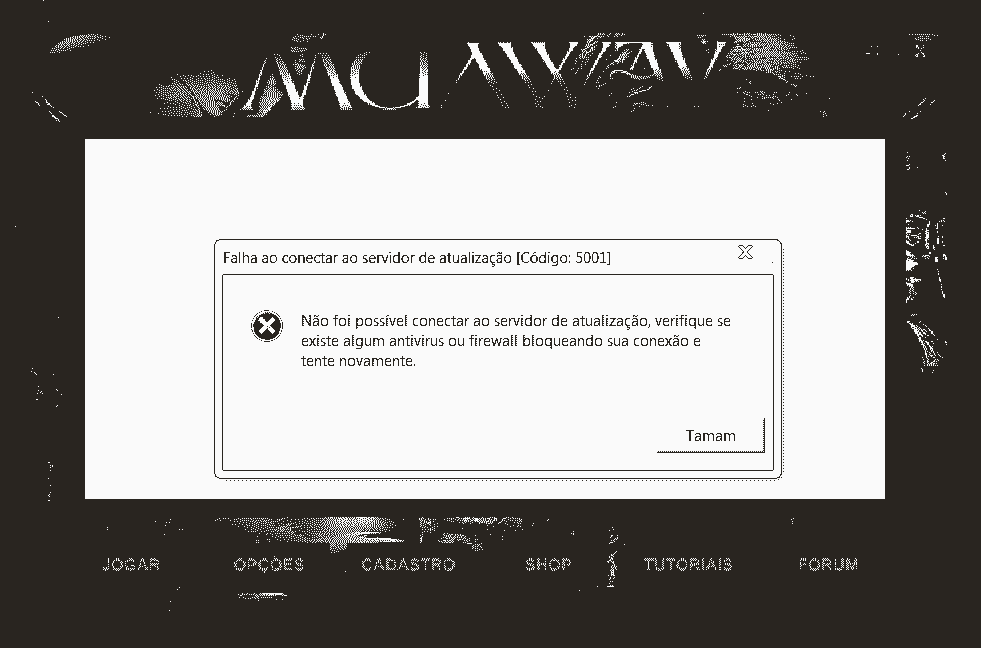
error-min.PNG

  • Respostas 13
  • Visualizações 1,4k
  • Criado
  • Última resposta

Mais Ativos no Tópico

Dias Populares

Postagens Populares

  • Greetings! I recommend that you try the following procedure: Quote 1st: right click on the MuAwaY Icon. 2nd: Click on "Open file location" 3rd: Look for the files "Update" and "Settings" and


Posted Images

Posts Recomendados

Postado
Greetings!

I recommend that you try the following procedure:

Quote

1st: right click on the MuAwaY Icon.
2nd: Click on "Open file location"
3rd: Look for the files "Update" and "Settings" and delete both of them
4th: Right click on the MuAwaY Icon and then click on Run as administrator and try starting the game.


By the way if this procedure does not work I recommend you contact the support group through the following email: suporte@muaway.net or divix@muaway.net

Editado por Deus

Postado
Good morning, Check that the game is not open closing the launche and Pressing the key F9, if it doesn't work, perform the procedure below.

Spoiler


If the above procedure does not resolve, I recommend that you perform the procedure in the tutorial below and disable your firewall and antivirus.

[Tutorial] - Removendo o MuAwaY completamente de seu computador


@Edit:Alteração no texto para Idioma English.

Editado por LUIG

Postado
Hello,
Check if you have any antivirus or firewall active, if you have it disabled, if it doesn't work perform this procedure:

Quote

1. Right-click on the MuAwaY launcher;
2. Go to open file location;
3. Search for and delete the Update file;
4. Run the launcher as an administrator, and wait to update
Imagem
Imagem
Postado
Hello,

Try the following procedure:

Quote

1º- Click on the server Launcher with Right Mouse Button.
2º- Click on "Open File Location".
3rd - Locate and Delete the files "Update" and "Settings"
4th - Run the Launcher as an administrator and try to log in again.


In case it doesn't work, I advise that you are completely uninstalling the server and installing again, I will leave a tutorial below so that you can do it in the correct way and thus solving your problem:

[Tutorial] - Removendo o MuAwaY completamente de seu computador

If both methods do not work, contact support via email at: suporte@muaway.net and explain your problem, the administration will assist you until it is resolved.

We look forward to your reply.
Imagem
Imagem
Imagem


Atenciosamente: Menor
MuAwaY - Projetando e Construindo sua diversão.
Postado
This error is very easy to solve, just click with the right mouse button on the MuAwaY icon, open the game's files folder and delete the Update and Settings folders, after that, just start the launcher normally wants to update the server.

Editado por Kuhn

Imagem
Postado

Como o motivo é muito claro, analise se é o anti-vírus que está impedindo a execução do jogo, depois de desativar, tente novamente para abrir o jogo e veja se é bem-sucedido.

As the reason is very clear, analyze if it is the Anti-virus that is preventing the game from running, after deactivating try again to open the game and see if it is successful

Postado
Hellow,


I recommend that you delete the Update.ini file from the game folder and do the update again. Also disable your computer's Firewall and Anti-Virus. If your problem has not been resolved please contact us by email suporte@muaway.net.
Atenciosamente, Bira - Travar!

MuAwaY! - Projetando e construindo sua diversão.


Imagem
Postado
Hi!

Quote

1º- Click on the server Launcher with Right Mouse Button.
2º- Click on "Open File Location".
3rd - Locate and Delete the files "Update" and "Settings"
4th - Run the Launcher as an administrator and try to log in again

Continuing, address by email: suporte@muaway.net or divix@muaway.net
Imagem
Imagem
Postado
Follow the steps below to solve this problem:

Quote

1st: Right click on the MuAwaY Icon.
2nd: Click on "Open file location"
3rd: Look for the files "Update" and "Settings" and delete both of them
4th: Right click on the MuAwaY Icon and then click on Run as administrator and try starting the game.
Imagem
Imagem
Imagem
Postado

Turn it off firewall or antivirus, switch the setting to off. You need to use that's being blocked, you can allow it through the firewall, instead of turning the firewall off.

If the procedures above informed by me and support members does not have helped you, you should send an email address to suporte@muaway.net or divix@muaway.net.
Imagem
Imagem
Imagem
Visitante
Este tópico está impedido de receber novos posts.

Account

Navigation

Pesquisar

Pesquisar

Configure browser push notifications

Chrome (Android)
  1. Tap the lock icon next to the address bar.
  2. Tap Permissions → Notifications.
  3. Adjust your preference.
Chrome (Desktop)
  1. Click the padlock icon in the address bar.
  2. Select Site settings.
  3. Find Notifications and adjust your preference.