Ir para conteúdo
View in the app

A better way to browse. Learn more.

MuAwaY Forum

A full-screen app on your home screen with push notifications, badges and more.

To install this app on iOS and iPadOS
  1. Tap the Share icon in Safari
  2. Scroll the menu and tap Add to Home Screen.
  3. Tap Add in the top-right corner.
To install this app on Android
  1. Tap the 3-dot menu (⋮) in the top-right corner of the browser.
  2. Tap Add to Home screen or Install app.
  3. Confirm by tapping Install.

(Respondido)Sobre problema visual na Hammer of Snow [C]

Postado
Boa noite, gostaria de saber se esta correto essa Hammer of Snow não ter as "Options Snow", conforme ilustra no topico da promoção.
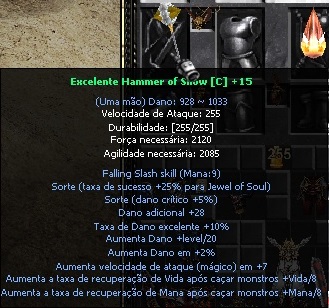
print21.jpg

  • Respostas 5
  • Visualizações 1,1k
  • Criado
  • Última resposta

Mais Ativos no Tópico

Posted Images

Posts Recomendados

Postado
Realmente está faltando os adicionais "Snow", creio que já deve ter chego até a administração e em próximas atualizações já estará normalizado, todavia encaminhe ao DiviX/ticket para reforçar sobre.
Postado
Olá,

Nos foi repassado que alguns erros que ocorreram durante os últimos dias serão corrigidos nas futuras atualizações, este pode ser um deles. Todavia aguarde.
Atenciosamente: Breno_GM
Mu AwaY - Projetando e construindo a sua diversão!

Imagem
Imagem
Visitante
Este tópico está impedido de receber novos posts.

Account

Navigation

Pesquisar

Pesquisar

Configure browser push notifications

Chrome (Android)
  1. Tap the lock icon next to the address bar.
  2. Tap Permissions → Notifications.
  3. Adjust your preference.
Chrome (Desktop)
  1. Click the padlock icon in the address bar.
  2. Select Site settings.
  3. Find Notifications and adjust your preference.