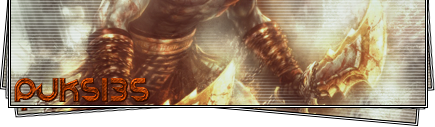
Postado Setembro 11, 2012 14 anos Traduzir comment_2876834 como eu faço a tal "bordinha"??? Denunciar
Postado Setembro 11, 2012 14 anos Traduzir comment_2876839 Olá, Amigo basta você ir em File>Stroke depois é só você circular no local que queres. Atenciosamente, Copas - MuAwaY Projetando e Construindo a sua Diversão. Powered LightZero Denunciar
Postado Setembro 11, 2012 14 anos Traduzir comment_2876841 Amigo se você está se referindo a bordas modeladas para Sign,veja abaixo um tutorial,a borda e iniciante mas com o tempo você vai ficando experiente e seguindo tutorial mais avançados. Denunciar
Postado Setembro 11, 2012 14 anos Traduzir comment_2876843 basta ir em FILE>STROKE dai é só circular o local desejado!!! Atenciosamente:Mighty Mu Away projetando e construindo a sua diversão Denunciar
Postado Setembro 11, 2012 14 anos Traduzir comment_2876858 [Tutorial] Criando a Bordinha na GFX: http://forum.muaway.net/index.php?/topic/175707-tutorial-criando-a-famosa-bordinha-na-gfx/ Video Aula: Denunciar
Postado Setembro 11, 2012 14 anos Traduzir comment_2876927 Tutorial. http://forum.muaway.net/index.php?/topic/175707-tutorial-criando-a-famosa-bordinha-na-gfx/ Atenciosamente,Maresia_TS Muaway.Projetando e Construindo Sua Diversão Minha Galeria ~• Denunciar
Postado Setembro 11, 2012 14 anos Traduzir comment_2876932 Amigo , segue abaixo o link do tutorial para criar a "Bordinha" GFX Como Pedido : http://www.youtube.com/watch?v=Rpt_uz5O73Y Denunciar
Postado Setembro 12, 2012 14 anos Traduzir comment_2877675 Dúvida respondidaCaso precise reabrir o tópico, me envie uma MP solicitando. Denunciar