Ir para conteúdo
View in the app

A better way to browse. Learn more.

MuAwaY Forum

A full-screen app on your home screen with push notifications, badges and more.

To install this app on iOS and iPadOS
  1. Tap the Share icon in Safari
  2. Scroll the menu and tap Add to Home Screen.
  3. Tap Add in the top-right corner.
To install this app on Android
  1. Tap the 3-dot menu (⋮) in the top-right corner of the browser.
  2. Tap Add to Home screen or Install app.
  3. Confirm by tapping Install.

(Respondido)[Pedido] Tutorial

Postado
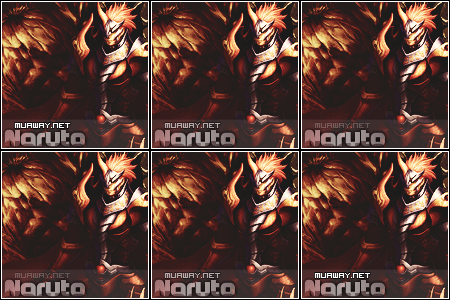
Ae Galera e o seguinte , vejo que varias pessoas quando fazem as Signs coloca o Nome do Site do Mu e o seu Nome . Mais queria saber como que faz isso ou alguem poderia me indica algum tutorial ? Se puder ajudar valendo ++ Vlws ....
  • Respostas 7
  • Visualizações 562
  • Criado
  • Última resposta

Mais Ativos no Tópico

Postagens Populares

  • É Uma Tipografia. Basta Pegar a Ferramenta Horizontal Type Tool (T) ou apertar o "T" do seu Teclado. Ou Clicar no Icone "". Após Selecionar está Ferramenta. Clique em Qualquer Lugar e Escreva. "muawa

Posts Recomendados

Postado
Amigo isso se faz pelo Photo Shop Siga Link Abaixo


Download Do PhotoShop Completo
Segue Link Abaixo


Quote

http://www.baixedetudo.net/download-adobe-photoshop-cs5
Postado
É Uma Tipografia. Basta Pegar a Ferramenta Horizontal Type Tool (T) ou apertar o "T"
do seu Teclado. Ou Clicar no Icone "Imagem". Após Selecionar está Ferramenta. Clique em Qualquer Lugar e Escreva. "muaway.net" e Coloque a Font Visitor.

Essa font muito usada é a Visitor.

Download - http://www.dafont.com/visitor.font

Preview:
Imagem

Para instalar a Font, observe o Tutorial.

[Tutorial] Instalando Fontes:
Postado
corereto /\
Imagem
Imagem
MuAwaY Projetando e construindo a sua diversão .
Atenciosamente Neon_
Imagem
Postado
É Uma Tipografia. Basta Pegar a Ferramenta Horizontal Type Tool (T) ou apertar o "T"
do seu Teclado. Ou Clicar no Icone "". Após Selecionar está Ferramenta. Clique em Qualquer Lugar e Escreva. "muaway.net" e Coloque a Font Visitor.


Eu uso o photoscape pois é mais simples
-

Atenciosamente : GameZoorD-
MuAwaY Projetando e construindo sua diversão


Imagem
Imagem


Imagem
Postado

Tópico movido para área correta , Dúvidas Sobre Designer !

Imagem
Imagem
Postado
Dúvida respondida

Caso precise reabrir o tópico, me envie uma MP solicitando.
Imagem
Imagem
Visitante
Este tópico está impedido de receber novos posts.

Account

Navigation

Pesquisar

Pesquisar

Configure browser push notifications

Chrome (Android)
  1. Tap the lock icon next to the address bar.
  2. Tap Permissions → Notifications.
  3. Adjust your preference.
Chrome (Desktop)
  1. Click the padlock icon in the address bar.
  2. Select Site settings.
  3. Find Notifications and adjust your preference.