Ir para conteúdo
View in the app

A better way to browse. Learn more.

MuAwaY Forum

A full-screen app on your home screen with push notifications, badges and more.

To install this app on iOS and iPadOS
  1. Tap the Share icon in Safari
  2. Scroll the menu and tap Add to Home Screen.
  3. Tap Add in the top-right corner.
To install this app on Android
  1. Tap the 3-dot menu (⋮) in the top-right corner of the browser.
  2. Tap Add to Home screen or Install app.
  3. Confirm by tapping Install.

(Respondido)Foto pessoal e gif

Postado
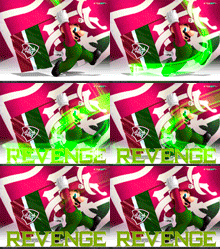
EU QUERIA UMA VIDEO AULA DESSAS 2 FOTO AI AKI NO PHOTO SHOP CS5

ExFoDaoLoL.953.gif

REVENGE.189.gif

C:\Users\Rodrigo\Desktop\Minhas Gifs\Gif-2.gif
  • Respostas 6
  • Visualizações 623
  • Criado
  • Última resposta

Mais Ativos no Tópico

Dias Populares

Posted Images

Posts Recomendados

Postado
Feita Pelo Instagram

- Tutorial By: Instagram

http://forum.muaway.net/index.php?/topic/256725-video-aula-efeitos-gif-na-tipografia-nivel-intermediario/page__p__2416854__fromsearch__1&#entry2416854
Imagem
Imagem


Imagem

Powered By: AwayDS

------- 我不得不把它翻譯,但沒有其他步驟節能 -------
Postado
http://forum.muaway.net/index.php?/topic/257219-video-tutorial-gif-de-luzes-em-foto-pessoal/
este lhe responde a pergunta
-INF0RM4L-
Imagem
Salve a _CrisTal_
Imagem
Imagem
Spoiler

Sempre Dando Um Salve Para Os INICIANTES Do Nosso Fórum!
Postado

Ver postInstagram, em 04 May 2012 - 04:50 PM, disse:

Olá galerinha, recebi uma MP do membro Versus-BR pedindo para eu ensinar a fazer uma foto que tenha o mesmo efeito do meu avatar. Segue abaixo o tutorial:

Preview:
Imagem


http://www.youtube.com/watch?v=z4tWGO_iRf0

Alguns gifs com o fundo preto:
Spoiler


Alguns trabalhos de minha autoria feitos com esses gifs:
Imagem

Imagem

Abç :P
Postado
Dúvida respondida

Caso precise reabrir o tópico, me envie uma MP solicitando.
Imagem
Imagem
Visitante
Este tópico está impedido de receber novos posts.

Account

Navigation

Pesquisar

Pesquisar

Configure browser push notifications

Chrome (Android)
  1. Tap the lock icon next to the address bar.
  2. Tap Permissions → Notifications.
  3. Adjust your preference.
Chrome (Desktop)
  1. Click the padlock icon in the address bar.
  2. Select Site settings.
  3. Find Notifications and adjust your preference.