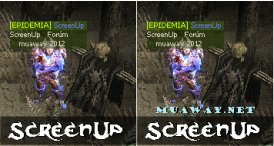
Postado Janeiro 29, 2012 14 anos Traduzir comment_2044666 Alguem me manda um tutorial de como fazer uma foto pessoal com essa animação Denunciar
Postado Janeiro 29, 2012 14 anos Traduzir comment_2044674 Veja esse tutorial do -LukaS- de como fazer uma FotoPessoal: http://forum.muaway.net/index.php?/topic/124391-tutorialfoto-pessoal-gfx-iniciante/page__pid__1710010__st__0&#entry1710010 EDITE: [Tutorial]Foto Pessoal - James http://forum.muaway.net/index.php?/topic/112391-tutorialfoto-pessoal/ [Tutorial] - Foto Pessoal - Ghost- http://forum.muaway.net/index.php?/topic/70605-tutorial-foto-pessoal/ Segue o plano!! Denunciar
Postado Janeiro 29, 2012 14 anos Traduzir comment_2044676 Isso nao é photoshop cs3 isso é fhotoscape. Denunciar
Postado Janeiro 29, 2012 14 anos Traduzir Autor comment_2044680 -Julio, em 29 January 2012 - 01:11 PM, disse:Veja esse tutorial do -LukaS- de como fazer uma FotoPessoal: http://forum.muaway.net/index.php?/topic/124391-tutorialfoto-pessoal-gfx-iniciante/page__pid__1710010__st__0&#entry1710010 Nesse tutorial o video foi removido pelo usuario Denunciar
Postado Janeiro 29, 2012 14 anos Traduzir comment_2044688 - Siga este tutorial amigo. http://forum.muaway.net/index.php?/topic/124391-tutorialfoto-pessoal-gfx-iniciante/page__pid__1710010__st__0&#entry1710010 Ou: Denunciar
Postado Janeiro 29, 2012 14 anos Traduzir comment_2044853 Segue abaixo.! http://forum.muaway.net/index.php?/topic/186928-tutorial-tipografia-animacao/ Você pode ser quem quiser, Basta querer ! Denunciar
Postado Janeiro 29, 2012 14 anos Traduzir comment_2046057 Dúvida respondida Caso precise reabrir o tópico, me envie uma MP solicitando. BERTAO REI DAS BOX Denunciar