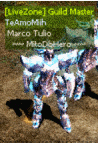
Postado Janeiro 19, 2012 14 anos Traduzir comment_1998971 qual nome dessa fonta escrito PANK? Denunciar
Postado Janeiro 19, 2012 14 anos Traduzir comment_1998989 Ela se chama Impact porem para ficar assim você deve escrever com Capislook ligado. Denunciar
Postado Janeiro 19, 2012 14 anos Traduzir comment_1999728 Nova solid Atenciosamente: TheFuck-TM MuAwaY - Projetando e construindo a sua diversão. Denunciar
Postado Janeiro 20, 2012 14 anos Traduzir comment_1999851 Se chama IMPACT, muito usada em "Caps Lock", em signs GFX últimamente. http://forum.muaway.net/index.php?/user/89259-onix-ts/ Denunciar
Postado Janeiro 20, 2012 14 anos Traduzir comment_2000762 Nova solid Atenciosamente - T1T0 MuAwaY- Projetando & construindo sua diversão Denunciar
Postado Janeiro 24, 2012 14 anos Traduzir comment_2017074 Dúvida respondida Caso precise reabrir o tópico, me envie uma MP solicitando. Equipe MuAwaY - Projetando e construindo a sua diversão! Denunciar